New in 0.2 Tasks, Focus, Reminders sync & AI agents

Your notch,
reimagined.

noNotch turns the cut-out at the top of your MacBook into a living Dynamic Island. Plan your day, run a focus timer, control music and see notifications, right where your eyes already are.

macOS 14 Sonoma or later · Apple Silicon & Intel · Works on any display

82%
18:42
REMINDER Call mom Today 5:00 PM · #family
DoneSnooze 5 min
call mom tomorrow 5pmTomorrow 5:00 PM#family
  • Ship the 0.2 release!high
  • Review design notes
  • Water the plantsevery day
Midnight City Waiting in a car, waiting for a ride in the dark

Hover the island · it cycles through tasks, focus, reminders and music on its own

New in 0.2

Your day, in the notch.

Tasks that understand you

Type “call mom tomorrow at 5pm every week #family !high” and noNotch sets the day, reminder, repeat, project and priority. Add steps and notes, plan ahead in Upcoming, and unfinished work rolls to today on its own.

Tomorrow 5:00 PM ↻ weekly ⚑ high #family
Reminders that open the notch

When a task is due, the island opens with a chime. Snooze it five minutes or tick it off, right there.

Focus timer

Countdown or stopwatch, with or without a task. Add five minutes, pause, and it waits while your Mac sleeps. It stays beside the notch after you close it.

Daily notepad

A fresh page every day. Press ⌘↩ on any line to turn it into a task.

Insights

A week of tasks done and time focused, plus the hours you get the most done.

Reminders sync

Optional two-way sync with a “noNotch” list in Apple Reminders, so tasks reach your iPhone and Apple Watch.

Dictation & smart suggestions

Speak a task, recognised on your Mac. On macOS 26, Apple Intelligence suggests a priority and project, on device.

Works with Claude and Cursor

noNotch has a built-in MCP server. Connect Claude Code, the Claude app or Cursor in one click from Settings, then just ask: “What's on my list today?”, “Plan my day”, “Start a 25-minute focus on my top task.”

Everything, one glance away

Small island. Big ideas.

Now Playing, music and video

Spotify, Apple Music, YouTube, Netflix, VLC, IINA. Artwork, scrubbing, AirPlay and ±15 s skips for video. Live, time-synced lyrics glide by line by line.

Notifications in the notch

Messages, Slack and Mail banners grow out of the island, iOS-style, with a history one click away.

Live Activities

Charging, AirPods, downloads, meetings, focus timers and eye-break reminders, all compact beside the notch.

A better HUD

Volume and brightness slide into the notch instead of the old square in the middle of your screen.

Quick controls

Wi‑Fi, Bluetooth, Focus, Dark Mode, Keep Awake, sliders, screenshot, lock and a camera mirror.

Shelf & Clipboard

Drop files on the notch to hold them, drag them out anywhere or AirDrop them. Recent copies are kept too.

Calendar & Weather

Your next meeting with a Join button, a month grid, and local weather at a glance.

Notes

Jot something down without leaving what you're doing. Saved as you type.

Liquid Glass, built in

The open island is real Apple Liquid Glass that bends whatever is behind it, with glass controls that merge when pressed. Springs feel like iPhone, and everything runs on the GPU, so noNotch idles at 0% CPU.

No notch? No problem.

A pull-cord for every display.

On external monitors and older Macs, noNotch hangs a tiny cord from the top of the screen. It sways when you get close. Give it a tug and the island drops down.

Drag it down

Private by design

Everything stays on your Mac.

No accounts

No sign-up, no tracking, no analytics.

On-device

Tasks, notes, dictation and suggestions stay on your Mac. Reminders sync only if you turn it on.

Asked once

Every permission is explained on first launch. Skip any you don't want.

Lightweight

A 4.8 MB download that idles at about 0% CPU.

noNotch app icon

Get noNotch

Free. Version 0.2.0 · 4.8 MB · macOS 14 or later · Apple Silicon & Intel. What's new

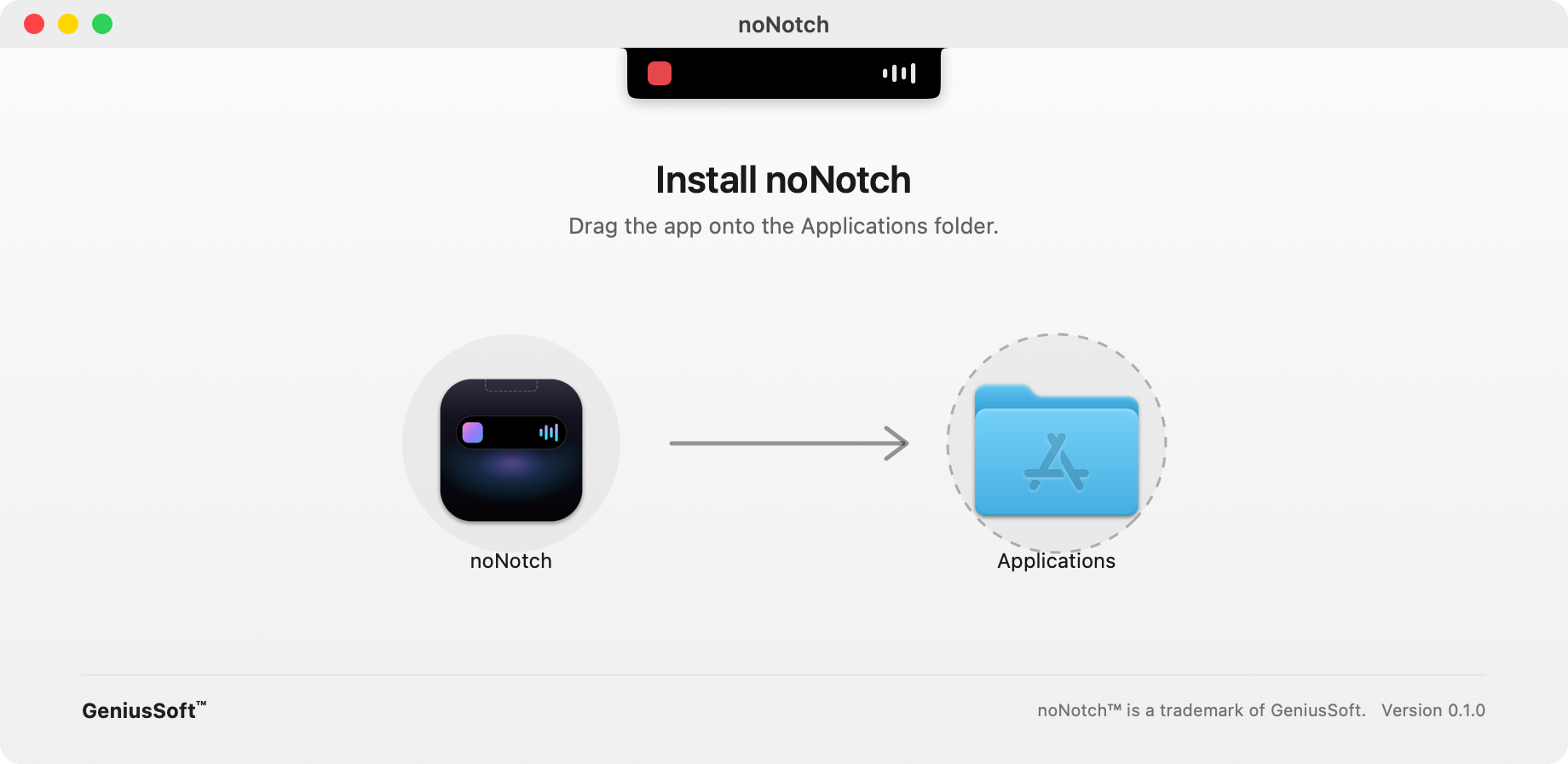
The noNotch installer window: drag the noNotch icon onto the Applications folder.
The installer. Drag noNotch onto Applications.
  1. Open the downloaded noNotch-0.2.0.dmg.
  2. Drag noNotch onto the Applications folder.
  3. Launch it from Applications and allow the permissions on the welcome screen.

First launch: if macOS says it can't verify the developer, right-click noNotch in Applications and choose Open.

Questions

Does it work without a notch?

Yes. On external displays and Macs without a notch, noNotch uses a pull-cord at the top of the screen, and shows a floating island when there's something to show.

Which players are supported?

Anything that reports to macOS Now Playing: Apple Music, Spotify, Podcasts, YouTube and Netflix in Safari, Chrome, Arc, Brave or Firefox, plus VLC, IINA and QuickTime.

Why does it need Accessibility?

To show volume and brightness in the notch instead of the system HUD, and to mirror notification banners. noNotch only reads what's on screen in those banners; nothing is sent anywhere.

Will it slow my Mac down?

No. Animations run on the GPU and services are event-driven, so noNotch sits at about 0% CPU when idle.

How do I connect Claude or Cursor?

Open noNotch Settings → AI agents and click Connect next to Claude Code, the Claude app or Cursor. Desktop apps need a restart, and there's a button for that. Everything runs locally: the MCP server is a small helper inside noNotch.app.

Does Reminders sync need iCloud?

It uses whatever account your Reminders app uses. Turn it on in Settings → Tasks, and noNotch keeps a “noNotch” list in sync both ways. It's off until you switch it on.

How do I quit or uninstall?

Use the menu-bar icon → Quit. To uninstall, drag noNotch from Applications to the Trash.